


- Posts: 9
- Thank you received: 4
Our Promotion
The countdown has ended
Save, Сэкономьте, Ahorrar
2026–2027 Academic Year Has Begun
The 2026–2027 academic year has begun. Students, parents, and educators can now create and continue their Progress Diaries in the new school-year section.
Learning experience
One student's problem
11 Jan 2013 18:25 #7680
by rbennett
One student's problem was created by rbennett
Hello SM friends!
I hope your 2013 is off to a good start. Prayers for the many, many across the country who have fallen prey to the serious flu bugs going around!
I am excited to see how much my new students (ages 5-10) have latched onto the Soft Mozart program! Parents are excited too. I do have one SM student who has an issue with the software and I have had it happen twice myself. Anyone who has insight into this please share and thanks for doing so.
Here's what happens. She gets into Gentle Piano and nothing happens. The notes of the song are frozen on the yellow line. She usually has to close out, disconnect the keyboard from the computer and open the program again but that doesn't always work. We tried something different the other day though, and it also worked for me when this occurred on my own program at home. We simply pressed "S" and let the computer play it and then it worked properly for her when she went to play through that same song.
Has anyone else had this happen? We first thought it was the computer but they've tried it on 2 different computers, a desktop and a laptop and it did the same thing, not very often but every now and then.
Thanks for any help you can offer!
Rhonda
I hope your 2013 is off to a good start. Prayers for the many, many across the country who have fallen prey to the serious flu bugs going around!
I am excited to see how much my new students (ages 5-10) have latched onto the Soft Mozart program! Parents are excited too. I do have one SM student who has an issue with the software and I have had it happen twice myself. Anyone who has insight into this please share and thanks for doing so.
Here's what happens. She gets into Gentle Piano and nothing happens. The notes of the song are frozen on the yellow line. She usually has to close out, disconnect the keyboard from the computer and open the program again but that doesn't always work. We tried something different the other day though, and it also worked for me when this occurred on my own program at home. We simply pressed "S" and let the computer play it and then it worked properly for her when she went to play through that same song.
Has anyone else had this happen? We first thought it was the computer but they've tried it on 2 different computers, a desktop and a laptop and it did the same thing, not very often but every now and then.
Thanks for any help you can offer!
Rhonda
Please Log in or Create an account to join the conversation.


11 Jan 2013 19:43 - 11 Jan 2013 19:45 #7681
by andreasro
Replied by andreasro on topic One student's problem
Yes, Rhonda, it happened to me too, just once or twice in a year.
If I recall, we did the same thing you did, the 2 solutions you've found out, pressing S key, or closing Gentle Piano and even disconnecting and reconnecting midi-Usb cable.
I didn't check the same software on other computers. So I thought it was an Operating System or keyboard recognition problem.
Thank you for pointing it out. Let us know if the problem persists and we'll look more into it.
For now, to help us find the cause, I'd like to know the operating system was the same on all computers? And did you use, for midi-USB connection, the same cable on all computers you tried?
My OS is Windows XP Professional, and I have USB Uno 1-1 cable.
Andrea
If I recall, we did the same thing you did, the 2 solutions you've found out, pressing S key, or closing Gentle Piano and even disconnecting and reconnecting midi-Usb cable.
I didn't check the same software on other computers. So I thought it was an Operating System or keyboard recognition problem.
Thank you for pointing it out. Let us know if the problem persists and we'll look more into it.
For now, to help us find the cause, I'd like to know the operating system was the same on all computers? And did you use, for midi-USB connection, the same cable on all computers you tried?
My OS is Windows XP Professional, and I have USB Uno 1-1 cable.
Andrea
Last edit: 11 Jan 2013 19:45 by andreasro.
Please Log in or Create an account to join the conversation.

11 Jan 2013 22:33 #7684
by the Moon
Replied by the Moon on topic One student's problem
Hi!
In my experience, Gentle Piano doesn't work on Windows 7...
In my experience, Gentle Piano doesn't work on Windows 7...
The following user(s) said Thank You: andreasro
Please Log in or Create an account to join the conversation.


11 Jan 2013 23:49 #7686
by Ines
Replied by Ines on topic One student's problem
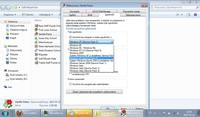
Try this?
The following user(s) said Thank You: andreasro
Please Log in or Create an account to join the conversation.
12 Jan 2013 00:00 #7688
by andreasro
You mean:
right-click on the Gentle Piano icon
choose Properties,
then Compatibility and
check Compatibility Mode / Run this program in compatibility mode for... and you choose an earlier version of the Operating System
 What a great idea! I never knew of that! Thank you! :kiss:
Вы имели в виду:
щелкните правой кнопкой мыши на иконке Gentle Piano
выберите Свойства,
Затем совместимости и
проверить совместимость Mode / Запустить программу в режиме совместимости с ... и вы выбираете более ранней версии операционной системы
Какая прекрасная идея! Я никогда не знал об этом! Спасибо! :kiss:
Replied by andreasro on topic One student's problem
Ines wrote: Try this?
You mean:
right-click on the Gentle Piano icon
choose Properties,
then Compatibility and
check Compatibility Mode / Run this program in compatibility mode for... and you choose an earlier version of the Operating System
What a great idea! I never knew of that! Thank you! :kiss:Вы имели в виду:
щелкните правой кнопкой мыши на иконке Gentle Piano
выберите Свойства,
Затем совместимости и
проверить совместимость Mode / Запустить программу в режиме совместимости с ... и вы выбираете более ранней версии операционной системы
Какая прекрасная идея! Я никогда не знал об этом! Спасибо! :kiss:
The following user(s) said Thank You: rbennett
Please Log in or Create an account to join the conversation.
12 Jan 2013 00:32 - 12 Jan 2013 00:34 #7689
by Ines
Exactly, it's work for me (not always, but often). You are welcome!
Replied by Ines on topic One student's problem
andreasro wrote: You mean:
right-click on the Gentle Piano icon
choose Properties,
then Compatibility and
check Compatibility Mode / Run this program in compatibility mode for... and you choose an earlier version of the Operating System
Exactly, it's work for me (not always, but often). You are welcome!
Last edit: 12 Jan 2013 00:34 by Ines.
The following user(s) said Thank You: rbennett
Please Log in or Create an account to join the conversation.
Time to create page: 0.449 seconds